

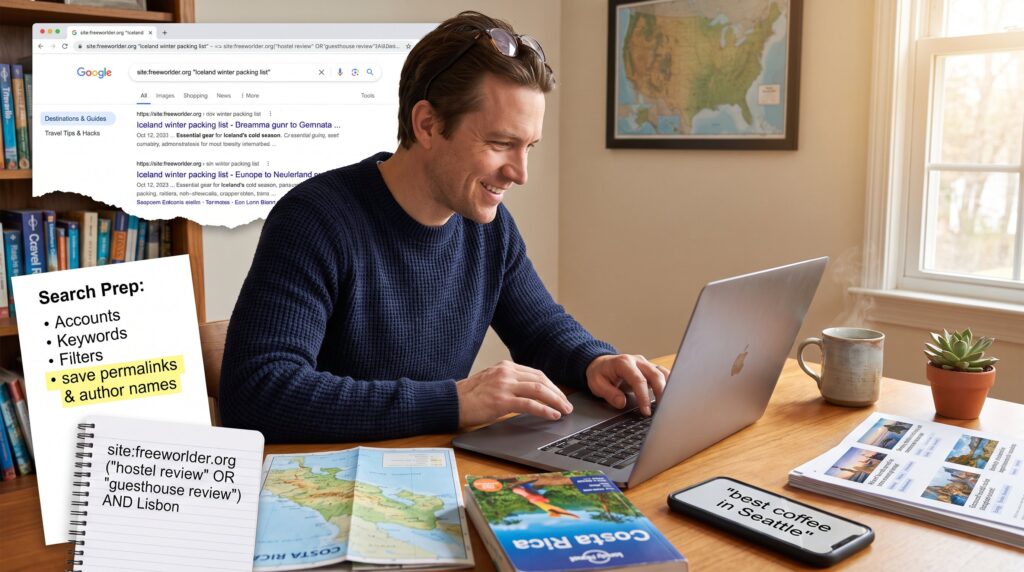
How to Search the FreeWorlder Travel Archive starts with a simple fact: the site’s indexed pages act like a topic-organized travel collection rather than a formal archival database. Readers who need trip ideas, destination guides, or category-based how-tos will find useful posts and category pages. This guide explains when the FreeWorlder Travel Archive view helps, how to prepare searches, and practical techniques, from basic keywords to advanced field queries, so they can find trips, tips, and maps faster on FreeWorlder and related resources.
Key Takeaways
- The FreeWorlder Travel Archive is a topic-focused collection of travel posts and category pages ideal for trip planning and local tips, not a formal archive database.
- Use precise keyword searches with 3+ terms and refine results with filters or category archives for faster, more relevant FreeWorlder Travel Archive searches.
- Advanced search techniques like Boolean operators and date filters via external search engines enhance precision on the FreeWorlder Travel Archive despite limited native search functions.
- Browsing by categories such as “Destinations & Guides” effectively uncovers location-specific content, maps, photos, and practical travel guides within the FreeWorlder Travel Archive.
- Saving permalinks and author names helps maintain access to valuable posts as site content may be reorganized within the FreeWorlder Travel Archive.
- When content seems missing, contacting post authors directly or using external search queries avoids dead-ends and improves research efficiency in the FreeWorlder Travel Archive.
What The FreeWorlder Travel Archive Contains And When To Use It
The FreeWorlder Travel Archive contains travel posts, category pages, and destination-focused guides indexed on the site rather than a separately documented archive. In practice, that means the searchable material is mostly blog-style content: destination write-ups, budget and safety tips, and occasional map or photo embeds.
When to use it: someone looking for firsthand trip planning tips, local cultural-exchange stories, or budget strategies should start here. It is less useful for researchers seeking raw datasets, formal bibliographies, or institutional records because no official archive schema or API docs appear to be published for a dedicated “Travel Archive.” Readers who want a pillar overview before searching can consult a core guide on the site, which summarizes the site’s scope and approach in practical terms: site overview.
Concrete example: a traveler planning a two-week Costa Rica trip will likely find route suggestions, packing lists, and budget tallies in category and destination posts rather than an archive-style index file. For destination directories and broad indexing behavior that mirror large travel hubs, users may compare FreeWorlder navigation to established destination portals.
Preparing To Search: Accounts, Permissions, And Search Scope
Fact: FreeWorlder’s public content is generally accessible without special accounts, but some pages may live inside category archives rather than a labeled archive product. The site does not publish documentation that requires user registration to read core travel posts.
What to check before searching: confirm whether the desired content sits behind category navigation or an authored post. If a page seems missing, try broad site searches or check category archives for related tags. They should expect no formal permissions or API keys for basic reading: if specialized datasets exist, the site will likely note access requirements on those specific pages.
Practical checklist: 1) Open the site home and note main categories like “Destinations & Guides” or “Travel Tips & Hacks.” 2) Use in-browser site search (Ctrl/Cmd+F) to scan long pages. 3) When collecting sources for planning, save permalinks and author names, this avoids losing a post that’s later reorganized. For newcomers, reading a primer on how the site structures content helps: try the site’s overview and planning guide to orient search scope.
Basic Search Essentials: Keywords, Filters, And Quick Result Tricks
Answer: Start searches with three precise keywords and refine with filters: this yields the fastest useful results. For example, use “Iceland winter packing list” rather than “Iceland packing.”
Keyword tips: use core nouns first (place, activity, tip) and add modifiers (budget, family, maps). Phrase queries in quotes for exact matches when necessary. If initial results are noisy, add a secondary keyword such as a season, budget threshold, or a local landmark.
Quick result tricks: 1) Use the site’s built-in category archives to filter by topic, category pages often act like manual filters. 2) Scan result snippets for date stamps: recent posts usually include updated tips. 3) If the site’s internal search is limited, use a targeted web search like site:freeworlder.org “keyword” to pull category and post hits from search engines.
Practical note: when compiling trip details, copy the most relevant post URL and a 1-sentence extract. That preserves context if the post moves. If users want structured budgeting content, the site includes specific budget guides that pair well with trip planners.
Advanced Search Techniques: Boolean, Date Ranges, And Field-Specific Queries
Key insight: FreeWorlder lacks a published advanced search grammar, so borrowing proven techniques from archive-style search systems unlocks better precision. Boolean operators, AND, OR, AND NOT, plus exact-phrase quotes and parentheses make complex queries far more precise.
How to apply them: use web search engine syntax when site search is weak. Example: site:freeworlder.org (“hostel review” OR “guesthouse review”) AND “Lisbon” AND -“2016” finds recent hostel reviews for Lisbon while excluding older posts.
Date filtering: when a site lacks native date-range filters, rely on search engine tools (Google’s time filter) or include year ranges in queries like “2023..2025” depending on syntax.
Field-specific queries: FreeWorlder’s posts typically include author, category, and tag fields, but the site does not publish query field names. Users should search by visible fields, author names or category slugs seen on pages, then combine with Boolean operators. Example: site:freeworlder.org “by Maria” AND “Nepal” narrows to posts by a named author.
Warning: without official search docs, advanced queries can miss content hidden behind pagination or dynamic pages. If critical content seems absent, try browsing category archives or contacting the author via the post’s byline.
Browsing By Category, Location, And Media (Maps, Photos, Guides)
Direct fact: Category pages are the clearest browsing path on FreeWorlder: location and media browsing are available indirectly through posts and tags. Users should begin with the most relevant category archive and then drill into posts for maps or photos.
How to browse categories: look for headings like “Destinations & Guides” or subject filters on the homepage. Category archives aggregate posts for that topic and often list older, curated guides at the top. For location-specific browsing, search the site for the place name plus “category” or check destination-focused archives.
Finding media: maps and photos typically live inside destination posts or downloadable guides rather than a separate media library. When a post includes a map image, the caption and alt text often include coordinates or trail names, copy those for offline use. If a reader seeks systematic media access (bulk photos, GIS files), FreeWorlder does not advertise a media API: they should contact the post author or use the individual post’s download links if present.
Useful internal links for deeper dives: when readers want budget planning alongside location content, the site’s budgeting guide helps pair costs with routes: similarly, destination directories show where to find detailed how-tos. Examples of related pages include a practical budget planner and destination guide pages that provide structured routes and cost examples.
Conclusion
Practical takeaway: treat the FreeWorlder Travel Archive as a topic-organized set of travel posts and category pages, not a formal archival database. Use precise keywords, borrow Boolean and date techniques via search engines when needed, and rely on category browsing for maps and guides. When results are scarce, save links and contact authors directly for clarifications, this beats spinning in search loops.